Reynolds Number Calculator
Find the Reynolds number of a pipe flow from velocity or flow rate, pipe size and fluid, and see whether it is laminar or turbulent.
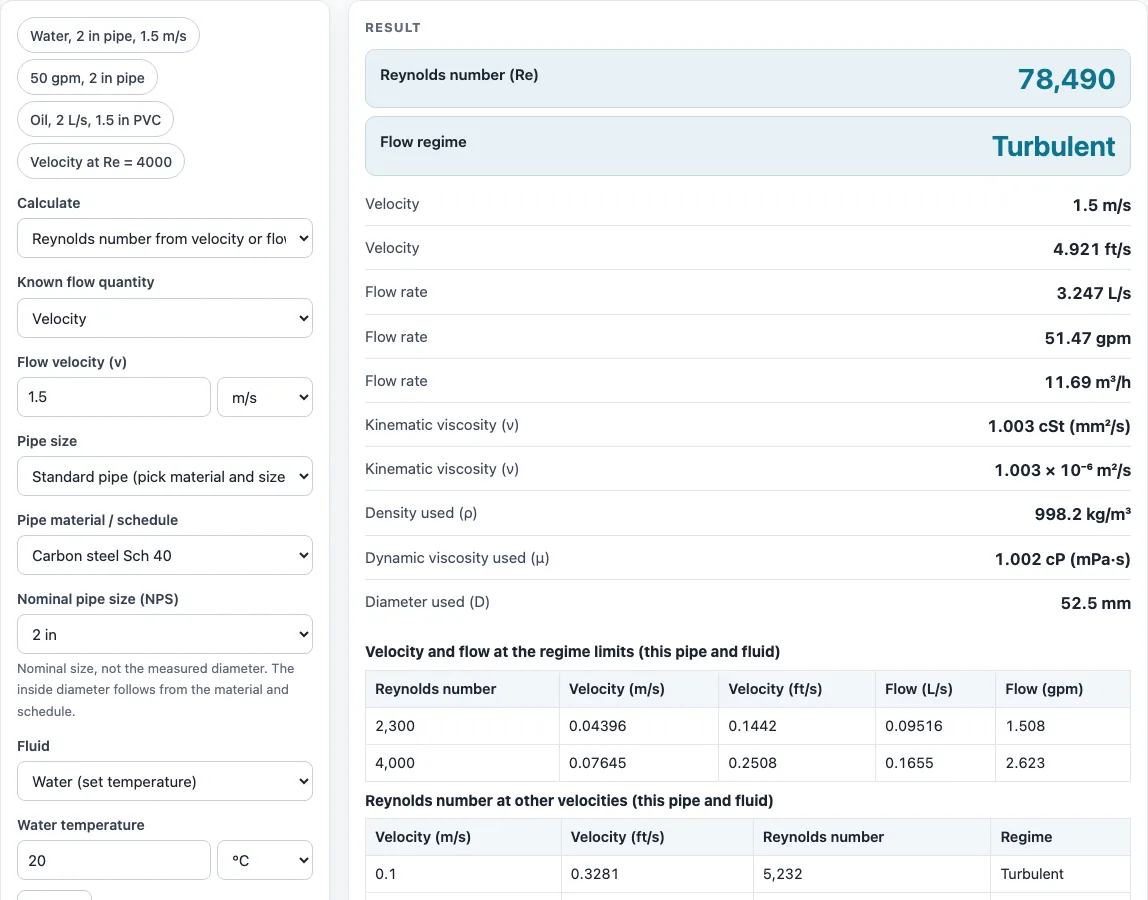
How to use the Reynolds number calculator
- Choose a mode. Use “Reynolds number from velocity or flow” to find Re from a known flow, or “Velocity and flow for a target Re” to find the velocity or flow that gives a set Re.
- In the first mode, enter either the flow velocity or the flow rate. Pick the unit from its menu (for example m/s, ft/s, gpm or L/s). Each quantity has its own unit menu, so you can mix metric and US customary units.
- Choose the diameter. Select a standard pipe (carbon steel, stainless, PVC, copper, PEX or HDPE, NPS 1/8 to 24), or type a custom diameter or characteristic length in in, mm, cm, m or ft.
- Choose the fluid: water at a temperature you set, seawater, any fluid by density and dynamic viscosity, or any fluid by kinematic viscosity alone.
- Read the result: Re, the flow regime, velocity, flow rate, viscosity, density and the diameter used.
- Open “How it was calculated” under the result to check the formula, the values substituted and the answer with units.
Preset buttons above the form load typical cases, “More options” holds the less common inputs, and “Reset” restores the starting example. “Copy result” copies the result lines with a link, “Copy link” copies the page address with all your inputs, and “Print / save as PDF” prints a one-page record.
What is the Reynolds number formula for pipe flow?
For pipe flow, the Reynolds number equation is Re = ρ·v·D ÷ μ, where ρ is density (kg/m³), v is velocity (m/s), D is the pipe inside diameter (m) and μ is dynamic viscosity (Pa·s). Because kinematic viscosity is ν = μ ÷ ρ, the same result is Re = v·D ÷ ν. The Reynolds number has no units; it is a ratio of inertial forces to viscous forces.
When you enter a flow rate instead of a velocity, the calculator first finds the area, A = π·D² ÷ 4, and then v = Q ÷ A. The steps panel writes the formula with your numbers in both forms, with ρ and μ and with ν.
For a non-circular duct or another shape, use the hydraulic diameter or the body length as D. The regime limits below apply to round pipes only.
At what Reynolds number does flow become turbulent?
In a round pipe, the calculator treats flow as laminar below Re 2300, transitional from 2300 to 4000, and turbulent from 4000. These are textbook approximations; some textbooks put the lower limit nearer 2000, so values near the boundary deserve care.
In the transitional range the flow can switch between laminar and turbulent, so the calculator warns that the regime is uncertain. Use the target-Re mode to see where a pipe leaves the laminar regime. It uses v = Re·ν ÷ D and Q = v·A. For example, Re 4000 in a 25 mm pipe with ν = 1 cSt needs v = 0.16 m/s, a flow of 0.0785 L/s.
Sources
- Re = ρvD/μ = vD/ν and the 2300 / 4000 regime limits: White, Fluid Mechanics; Çengel & Cimbala, Fluid Mechanics
- Water density (Kell 1975) and viscosity (IAPWS 2008 table), checked against the NIST Chemistry WebBook (within about 0.2 %)
- Pipe inside diameters: ASME B36.10M/B36.19M, ASTM D1785, ASTM B88 tables as listed on the pipe schedule chart
Results are for estimation; verify critical designs against the applicable standard.
Worked examples
| Input | Result |
|---|---|
| 1.5 m/s, Carbon steel Sch 40 NPS 2 | Re = 78,490 (Turbulent), v = 1.5 m/s |
| 50 gpm, Carbon steel Sch 40 NPS 2 | Re = 67,970 (Turbulent), v = 1.457 m/s |
| 2 L/s, PVC Schedule 40 NPS 1-1/2 | Re = 541.8 (Laminar), v = 1.523 m/s |
| Re 4000, D 25 mm | Re = 4,000 (Turbulent), v = 0.1605 m/s |
Calculated by the tool above with these values.
Frequently asked questions
How do I calculate Reynolds number for water at a given temperature?
Choose “Water” as the fluid and set the temperature in °C or °F (0 to 100 °C). The calculator looks up density and viscosity for that temperature, so you do not need to enter them. Its water values agree with the NIST WebBook within about 0.2 %.
What velocity gives Re = 2300 in my pipe?
Switch to “Velocity and flow for a target Re”, choose your pipe and fluid, and set Re to 2300. The result gives the velocity v = Re·ν ÷ D and the flow Q = v·A. The page also has a table with the velocity and flow at Re 2300 and 4000.
Is Re = 3000 laminar or turbulent?
Re 3000 falls in the transitional range, between 2300 and 4000. The flow can be either laminar or turbulent there, so the calculator warns that the regime is uncertain. Do not assume one regime without checking the design basis.
Can I use the results in commercial projects or client reports?
Yes. Results may be used in commercial work, including quotes, design notes, reports and client projects, without attribution. The tool is for estimation only, and it does not certify compliance with any code. Verify critical designs against the applicable standard.
Is the calculator free, and is anything I type uploaded?
Yes, it is free, and there is no account or sign-up. Everything is calculated in your browser, and nothing you type is uploaded.
Can I print or share a calculation?
Yes. “Print / save as PDF” produces a one-page record with the inputs, results, calculation steps and date. “Copy link” copies a page address that stores every input in the ?s= part of the URL, so the same calculation reopens later or can be sent to a colleague.
Related tools
- Moody chart: read friction factors once you know whether the flow is laminar or turbulent.
- Pipe velocity calculator: find the velocity in a pipe from a flow rate and diameter.
- Pressure drop calculator: estimate the head or pressure loss along a pipe run.
- Pipe flow calculator: work out flow in a pipe from the other pipe-flow inputs.
- Flow rate calculator: convert between flow rate and velocity for a known area.
- All pipe, pump and valve calculators: browse every calculator on the site.