Relief Valve Sizing Calculator
Enter the relieving flow, set pressure and fluid properties to get the required effective area and the smallest standard orifice letter that covers it.
How to use the Relief Valve Sizing Calculator
- Under Fluid to relieve, choose gas or vapor, steam, or liquid.
- Enter the required relieving flow and pick its unit from the menu. Gas and steam accept kg/h, lb/h, kg/s, and t/h. Liquid accepts m³/h, gpm, L/min, and L/s.
- Enter the set pressure and choose gauge or absolute units.
- Check the overpressure percentage. It defaults to 10%.
- For gas or vapor, enter the relieving temperature, molecular weight, and k = cp/cv. For liquid, enter the specific gravity.
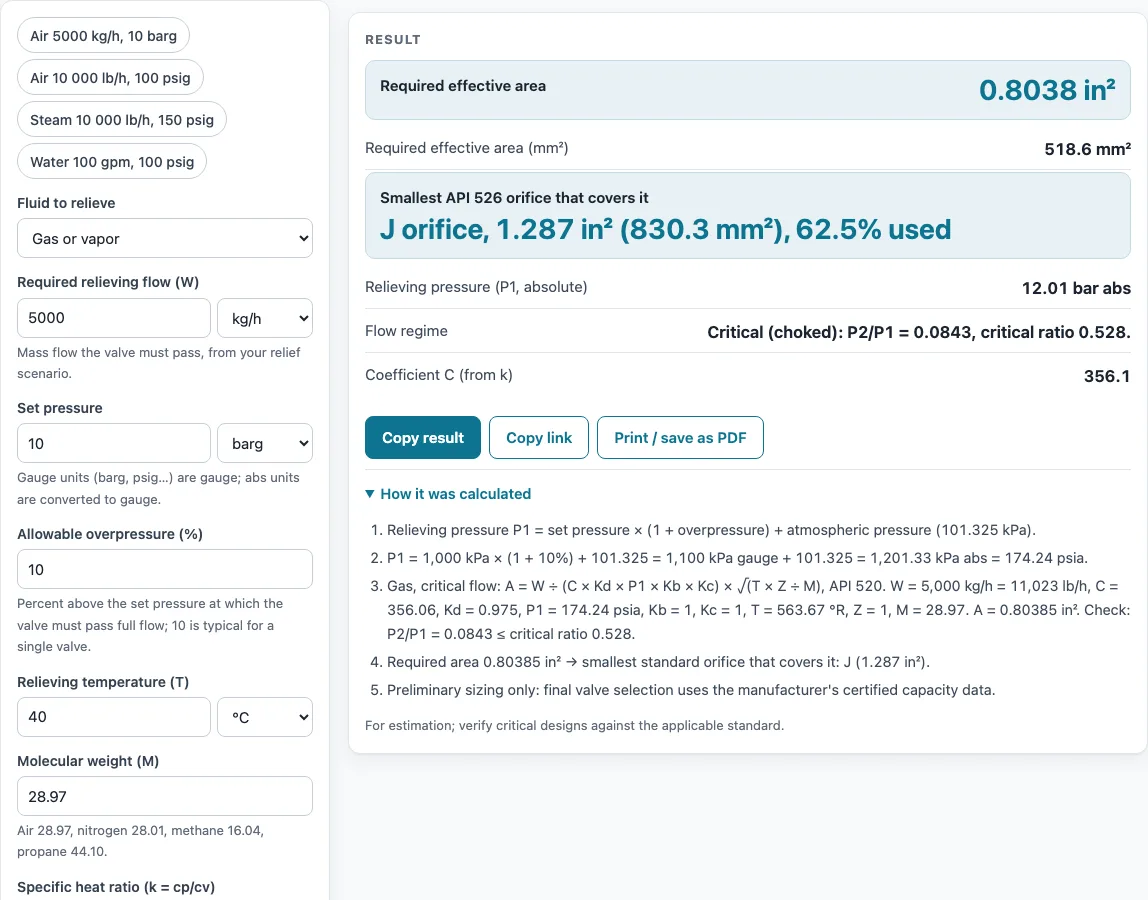
- Read the result. It shows the required area in in² and mm², the smallest API 526 orifice that covers it, the percent of that orifice used, and the relieving pressure. For gas, it also shows the coefficient C and the flow regime.
- Read any warnings below the result, then open “How it was calculated” to see the formula, the substituted values, and the answer with units.
The result updates as you type. Preset buttons above the form load typical cases, such as air, steam, and water. “More options” holds the less common inputs: back pressure (default 0 barg), Z, Kd, Kb, Kw, Kc, and Ksh. “Reset” restores the starting example.
“Copy result” copies the result lines with a link. “Copy link” copies the page address, which stores every input, so the same calculation can be reopened later or sent to a colleague. “Print / save as PDF” produces a one-page record with the inputs, results, calculation steps, and date.
What does a relief valve sizing calculation actually solve?
It solves for the discharge area a relief valve needs to pass a given flow at a given overpressure. The calculator works backward from the flow you enter and reports the minimum area, then matches that area to the next standard orifice that is large enough.
How is the relieving pressure worked out?
The relieving pressure P1 is the set pressure multiplied by one plus the allowable overpressure, plus atmospheric pressure (101.325 kPa). With a 10% overpressure, a set pressure of 10 barg gives a relieving pressure of about 12.013 bar absolute once the factors are included. All three fluid equations start from this value.
How is the area calculated for gas and vapor?
The gas equation is A = W / (C × Kd × P1 × Kb × Kc) × sqrt(T × Z / M). Here W is the flow in lb/h, P1 is in psia, T is in °R, and M is the molecular weight. The coefficient C depends on k, and it equals 356.06 when k = 1.4. For 5,000 kg/h of air at 10 barg set, the calculator gives 0.8038 in² (518.6 mm²), which needs a J orifice with 62.5% used.
How do steam and liquid differ?
Steam uses the Napier equation, A = W / (51.5 × P1 × Kd × Kb × Kc × Kn × Ksh). Kn is 1 up to 1500 psia and has a published correction above that. For 10,000 lb/h of steam at 150 psig set, the result is 1.108 in², which needs a J orifice.
Liquid uses A = Q / (38 × Kd × Kw × Kc × Kv) × sqrt(G / (P1 − P2)), with Q in gpm and pressures in psi. The viscosity correction Kv is taken as 1, and the calculator always warns about this. For 100 gpm of water at 100 psig set, the result is 0.386 in², which needs a G orifice.
Kd defaults to 0.975 for gas and steam and 0.65 for liquid. These are the API 520 preliminary values.
Why does the result sometimes switch method or show warnings?
For gas, if the back-pressure ratio P2/P1 is above the critical ratio, the calculator switches to the API 520 subcritical equation with the factor F2. Balanced or pilot-operated valves need the manufacturer’s method, and the calculator warns about this. Other warnings cover overpressure below 3 psi, steam back pressure above 10% of set pressure, and unusual molecular weight, specific gravity, or temperature. If the required area is above 26 in², the result reads “Larger than T” and recommends more than one valve.
Sources
- API Standard 520 Part I sizing equations for gas, steam (Napier) and liquid, with Kd 0.975 gas and steam, 0.65 liquid
- API Standard 526 effective orifice areas D to T (as listed in the open-source “fluids” library)
- Preliminary sizing only: final selection uses the valve manufacturer’s certified capacity
Results are for estimation; verify critical designs against the applicable standard.
Worked examples
| Input | Result |
|---|---|
| gas, 5000 kg/h, set 10 barg | A = 0.8038 in² (518.6 mm²), J orifice, 1.287 in² (830.3 mm²), 62.5% used |
| gas, 10000 lb/h, set 100 psig | A = 1.015 in² (655.1 mm²), J orifice, 1.287 in² (830.3 mm²), 78.9% used |
| steam, 10000 lb/h, set 150 psig | A = 1.108 in² (715 mm²), J orifice, 1.287 in² (830.3 mm²), 86.1% used |
| liquid, 100 gpm, set 100 psig | A = 0.386 in² (249 mm²), G orifice, 0.503 in² (324.5 mm²), 76.7% used |
| steam, 20000 kg/h, set 25 barg | A = 2.123 in² (1,370 mm²), L orifice, 2.853 in² (1,841 mm²), 74.4% used |
Calculated by the tool above with these values.
Frequently asked questions
Can I use the results in commercial projects or client reports?
Yes. Results may be used in commercial work, including quotes, design notes, reports, and client projects, without attribution. They are still preliminary, so verify critical designs against the applicable standard.
Is the calculator free, and is anything I type uploaded?
The calculator is free, and there is no account or sign-up. Everything is calculated in your browser, so nothing you type is uploaded.
Can I print or share a calculation?
Yes. “Print / save as PDF” creates a one-page record with the inputs, results, calculation steps, and date. “Copy link” copies a page address that stores every input, so the calculation can be reopened or sent to a colleague.
Does the result certify that a valve meets a code?
No. The tool does not certify compliance with any code. Final valve selection uses the manufacturer’s certified capacity data and the applicable code relieving scenario.
Can I use it for steam with superheat?
Ksh = 1 is correct for saturated steam and is conservative for superheated steam. The calculator does not contain a superheat table, so if you want credit for superheat, enter the Ksh value from the manufacturer under “More options”.
Related tools
- Compressed Air Pipe Sizing Calculator: use it to size air distribution piping once you know the air flow.
- Gas Pipe Sizing Calculator: use it to size natural gas and propane lines that feed equipment.
- Steam Pipe Sizing Calculator: use it to size steam distribution piping.
- PVC Pipe Sizing Calculator and Chart: use it to size water and general piping for PVC, copper, PEX, and steel.
- Cv Calculator (Valve Flow Coefficient): use it to find the flow coefficient of a valve from flow and pressure drop.
- Flow Rate Calculator: use it to convert between flow rate values and units.
- GPM Calculator (Gallons per Minute): use it to work with flow in gallons per minute.
- All pipe, pump and valve calculators: use it to browse the full set of tools on the site.