Pipe Flow Calculator
Find how much a pipe can carry: enter the pressure available, the length and the pipe size, or switch to gravity flow for a sloped pipe running partly full.
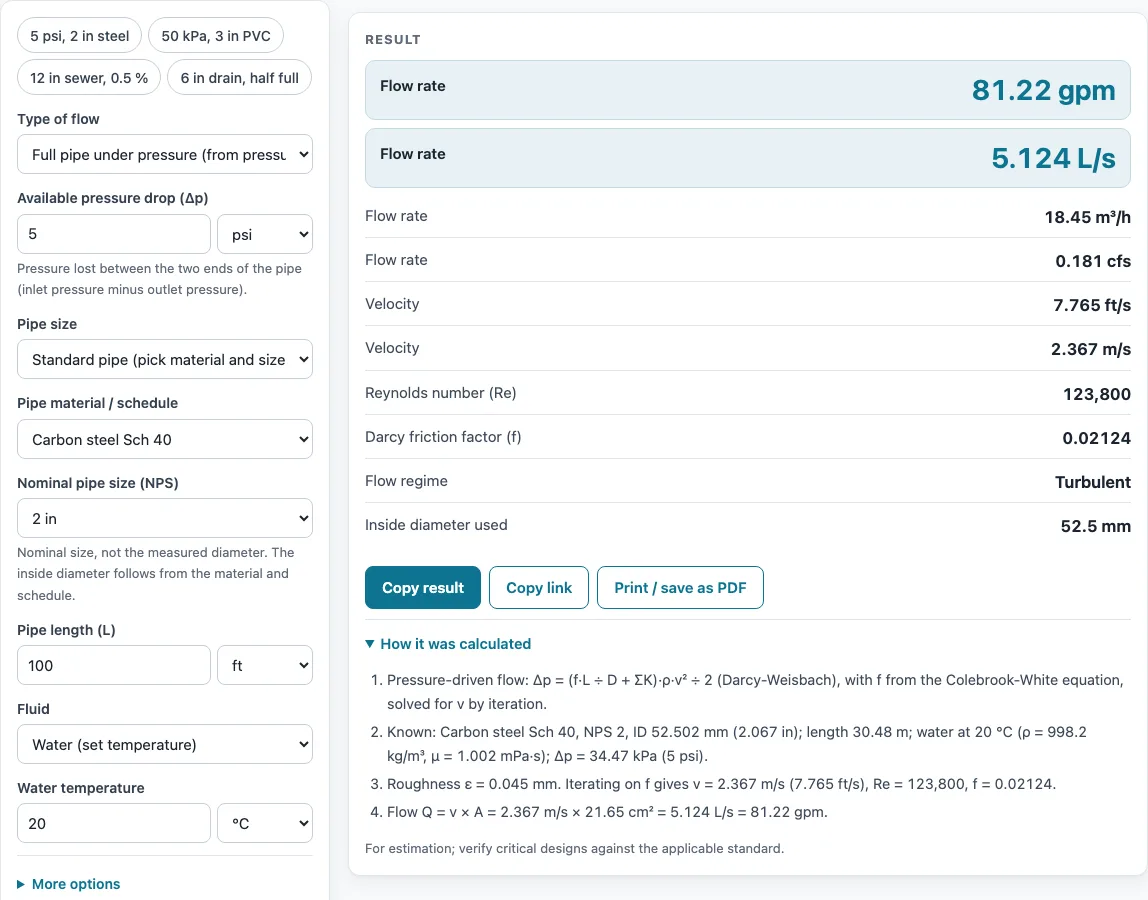
How to use the Pipe Flow Calculator
- Under Type of flow, use “Full pipe under pressure” when a pressure drop drives the flow. Use “Gravity flow, partly full (Manning)” for a circular pipe running by gravity.
- For pressure mode, enter the available pressure drop between the two ends of the pipe and pick its unit.
- Enter the pipe length.
- Select the pipe as a standard material and nominal size, or enter a custom inside diameter.
- Choose the fluid: water from 0 to 100 °C, seawater, or another liquid entered by density and viscosity.
- For gravity mode, select the pipe or enter a custom diameter, then enter the slope in %, m/m, ft/ft or in/ft.
- Enter the depth ratio y/D, where 1 means full. Leave Manning’s n empty to use the default for the material, or type your own value.
- Open “More options” for less common inputs, such as pipe roughness, elevation gain and fitting loss coefficients (ΣK) in pressure mode.
- Read the result, which updates as you type. Check any warnings, then open “How it was calculated” to see the formula and the values used.
Preset buttons above the form load typical cases, and “Reset” restores the starting example. “Copy result” copies the result lines with a link. “Copy link” copies the page address, which stores every input, so the calculation reopens later or can be sent to a colleague. “Print / save as PDF” prints a one-page record with the inputs, results, calculation steps and date.
How does the Manning equation pipe flow calculator work?
The gravity mode is a Manning equation pipe flow calculator: it estimates the flow in a circular pipe that runs partly full under gravity. It uses Manning’s equation, Q = (1 ÷ n) · A · R^(2/3) · S^(1/2), where Q is flow, n is the roughness coefficient, A is the wetted area, R is the hydraulic radius (wetted area divided by wetted perimeter) and S is the slope.
The depth ratio y/D sets how much of the pipe is wet. A half-full pipe carries exactly half of the full-pipe flow at the same velocity as a full pipe. At 80 % depth the flow is 97.7 % of full, and the largest flow is about 107.6 % of full, reached at roughly 93.8 % depth. The calculator reproduces these values, so you can check the shape of the curve for any pipe.
Manning’s n depends on the pipe material. If you leave the field empty, the calculator uses 0.009 for PVC, 0.010 for copper, 0.012 for steel and 0.013 for concrete or a custom pipe. The method assumes steady, uniform flow in a straight pipe. It does not model surcharge or backwater, so it is not suited to pipes that run full under pressure or that are affected by a downstream restriction.
How does a pipe flow calculator solve for flow under pressure?
In pressure mode, the calculator balances the pressure drop against friction and fittings. It solves (f·L ÷ D + ΣK) · ρ · v² ÷ 2 = Δp − ρ · g · Δz for the velocity v, where f is the Darcy friction factor, L is the length, D is the inside diameter, ΣK is the sum of fitting loss coefficients, ρ is density, Δp is the pressure drop and Δz is the elevation gain.
Because the friction factor depends on velocity, the calculator solves the equation by iteration. At each step it recalculates the friction factor from the Colebrook-White equation, or uses 64 ÷ Re when the flow is laminar. Once the velocity is known, the flow is Q = v × π ÷ 4 × ID².
Flow regime matters. Flow is laminar at low Reynolds numbers and turbulent at high ones. Between Re 2300 and 4000 the flow is transitional, and the calculator uses the higher turbulent friction factor, so the flow shown is conservative. If the elevation gain needs more pressure than the drop available, no positive flow is possible, and the calculator reports an error instead.
Sources
- Darcy-Weisbach and Colebrook-White (White, Fluid Mechanics; Crane TP-410); roughness: Moody (1944)
- Manning equation and partly full pipe geometry: Chow, Open-Channel Hydraulics (1959)
- Manning n: Chow Table 5-6 as reproduced by Ponce (SDSU) and FHWA; PVC 0.009 from Uni-Bell
- Pipe dimensions: see the Pipe Schedule Chart sources
Results are for estimation; verify critical designs against the applicable standard.
Worked examples
| Input | Result |
|---|---|
| Carbon steel Sch 40 NPS 2, Δp 5 psi, 100 ft | Q = 81.22 gpm (5.124 L/s), v = 7.77 ft/s |
| PVC Schedule 40 NPS 3, Δp 50 kPa, 200 m | Q = 112.7 gpm (7.11 L/s), v = 4.89 ft/s |
| Copper tube Type L NPS 3/4, Δp 10 psi, 80 ft | Q = 11.32 gpm (0.7141 L/s), v = 7.5 ft/s |
| ID 300 mm, slope 0.5 %, y/D 0.75 | Q = 988.3 gpm (62.35 L/s), v = 3.6 ft/s |
| PVC Schedule 40 NPS 6, slope 0.25 in/ft, y/D 0.5 | Q = 270.2 gpm (17.04 L/s), v = 6 ft/s |
Calculated by the tool above with these values.
Frequently asked questions
Can I use the results in commercial projects or client reports?
Yes. Results may be used in commercial work, including quotes, design notes, reports and client projects, without attribution. The page marks results as estimates, and the tool does not certify compliance with any code, so verify critical designs against the applicable standard.
Is the calculator free, and is anything I type uploaded?
The calculator is free. Everything is calculated in your browser, so nothing you type is uploaded, and there is no account or sign-up.
Can I print or share a calculation?
Yes. “Print / save as PDF” produces a one-page record with the inputs, results, calculation steps and date. “Copy link” copies a page address that stores every input, so a colleague can open the same calculation.
Why does the calculator show an error instead of a flow?
In pressure mode, the calculator reports an error when the elevation gain needs more pressure than the available pressure drop. No flow can be calculated in that case. Reduce the elevation gain or increase the available pressure drop and the result will update.
Can I mix metric and US customary units?
Yes. Each quantity has its own unit menu, so you can enter, for example, a pressure in psi and a length in metres. The tool converts the units before calculating.
What do the warnings mean?
Pressure mode warns about velocity above 3 m/s (10 ft/s), laminar flow, transitional flow and relative roughness above 0.05. Gravity mode warns about supercritical or near-critical flow, depth above 82 %, velocity below 0.6 m/s (2 ft/s), where solids may settle, velocity above 3 m/s, slope above 15 % and n outside 0.008 to 0.04.
Related tools
- Compressed Air Pipe Sizing Calculator: use it to size compressed air lines for a target flow and pressure loss.
- Flow Rate Calculator: use it to convert between volume flow and velocity when you already know the pipe area.
- Gas Pipe Sizing Calculator: use it to size natural gas and propane pipes.
- Mass Flow Rate Formula and Calculator: use it when you need flow expressed as mass per unit time rather than volume.
- Orifice Flow Calculator: use it to estimate flow through an orifice or restriction.
- Pipe Schedule Chart and Pipe Size Lookup: use it to look up wall thickness and inside diameter for a nominal pipe size.
- Pipe Velocity Calculator: use it to check the velocity in a pipe against design limits.
- All pipe, pump and valve calculators: use it to browse the full set of pipe, pump and valve tools.