Moody Chart and Friction Factor Calculator
Enter the Reynolds number and pipe roughness to get the Darcy friction factor and see your point on an interactive Moody chart.
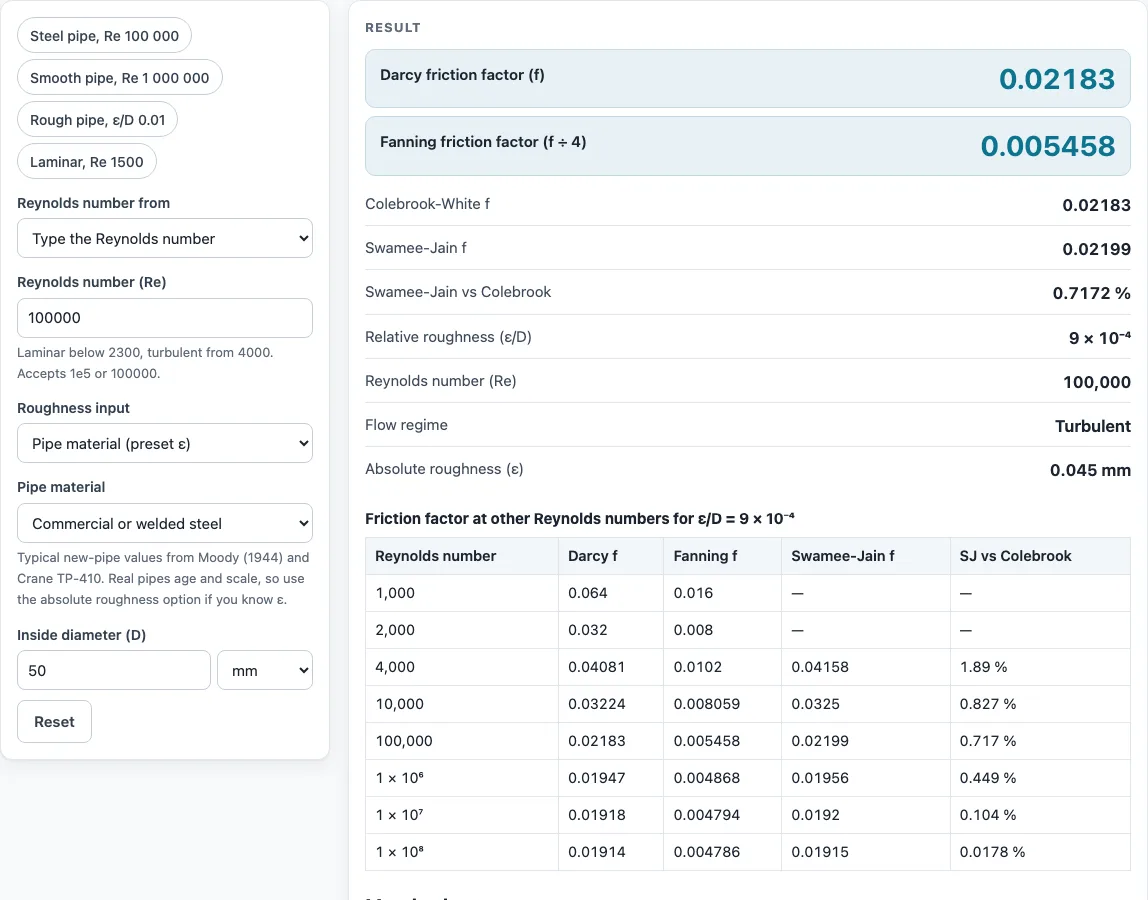
How to use the Moody chart
- Set the Reynolds number. Under “Reynolds number from”, type Re directly or choose Velocity, diameter and fluid. For water, pick a temperature. For seawater or another fluid, enter its density (ρ) and dynamic viscosity (μ).
- Set the roughness. Pick a pipe material such as commercial steel, cast iron, drawn tubing (copper, PVC, PEX, HDPE) or concrete. Or enter an absolute roughness ε together with the diameter D. Or type ε/D directly. For 0.045 mm commercial steel in a 50 mm pipe, ε/D is 0.0009.
- Read the results. The result shows the Darcy friction factor, the Fanning factor (Darcy ÷ 4), the Colebrook-White f, the Swamee-Jain f with its percent difference from Colebrook, ε/D, Re, and the flow regime.
- Check the chart. Your point is marked on the Moody diagram. If your ε/D is not a standard curve, a dashed curve for it is drawn through your point.
- Check the table. It lists f from Re 10³ to 10⁸ for your ε/D.
- Check the working. The “How it was calculated” section under the result shows the formula, the substituted values, and the answer with units.
The “More options” panel holds less common inputs, preset buttons load typical cases, and “Reset” restores the starting example. “Copy link” stores every input in the page address, so you can reopen the calculation later or send it to a colleague. “Copy result” copies the result lines with a link. “Print / save as PDF” produces a one-page record of inputs, results, steps and the date.
What is the friction factor formula for laminar flow?
For laminar flow, the Darcy friction factor is f = 64 ÷ Re. This applies when Re is below 2300. In this regime the wall roughness has no effect, so the same f applies to smooth and rough pipes alike. For example, at Re 1500, f = 0.04267.
What is the friction factor formula for turbulent flow?
For turbulent flow, Re is 4000 or above, and the usual formula is the Colebrook-White equation: 1/√f = −2·log10((ε/D)/3.7 + 2.51/(Re·√f)). Because f appears on both sides, it is solved by iteration. Start with a guess for f, substitute it into the right side, work out a new value from the left side, and repeat until the value stops changing.
The Swamee-Jain equation avoids iteration. It gives f = 0.25 ÷ [log10((ε/D)/3.7 + 5.74/Re^0.9)]². It is valid for 5000 ≤ Re ≤ 10⁸ and ε/D up to 0.01. Outside that range, the page shows a warning.
Between Re 2300 and 4000 the flow is transitional, and no formula gives a reliable f. The calculator shows the higher Colebrook value there, with a warning.
For fully rough flow, f depends only on ε/D. At ε/D = 0.05 it levels off near 0.0715.
What is relative roughness?
Relative roughness is the absolute roughness of the pipe wall divided by the inside diameter, ε/D. Because it is a ratio, the same material is relatively rougher in a small pipe than in a large one, so a small steel pipe sits on a higher curve of the Moody chart.
Sources
- Moody, L. F. (1944), “Friction factors for pipe flow”, Trans. ASME 66: the chart
- Colebrook, C. F. (1939), J. ICE 11: the Colebrook-White equation (solved iteratively)
- Swamee, P. K. and Jain, A. K. (1976), J. Hydraul. Div. ASCE 102(5): explicit friction factor, valid 5000 ≤ Re ≤ 10⁸, 10⁻⁶ ≤ ε/D ≤ 10⁻²
- Laminar f = 64/Re (Hagen-Poiseuille); roughness presets as on the pressure drop calculator (research/verify.md)
Results are for estimation; verify critical designs against the applicable standard.
Worked examples
| Input | Result |
|---|---|
| Re 100,000, ε/D 9 × 10⁻⁴ | Darcy f = 0.02183, Fanning f = 0.005458 (Turbulent) |
| Re 41,270, ε/D 2.95 × 10⁻⁵ | Darcy f = 0.02191, Fanning f = 0.005477 (Turbulent) |
| Re 1 × 10⁶, ε/D 1 × 10⁻⁴ | Darcy f = 0.01344, Fanning f = 0.00336 (Turbulent) |
| Re 1,500, ε/D 0.001 | Darcy f = 0.04267, Fanning f = 0.01067 (Laminar) |
Calculated by the tool above with these values.
Frequently asked questions
How do I read a Moody chart?
The chart uses logarithmic scales. Re runs along the horizontal axis from 10³ to 10⁸, and f runs up the vertical axis from 0.008 to 0.1. Find your Re, move up to the curve that matches your ε/D, then read f on the vertical axis. The laminar line, the shaded critical zone, and your marked point help you see the flow regime at a glance.
How accurate is the Swamee-Jain equation compared with Colebrook?
Within its valid range, Swamee-Jain is close to Colebrook. For example, at Re 100,000 and ε/D 0.0009, the Colebrook-White f is 0.02183 and the Swamee-Jain f is 0.02199, a difference of +0.72 %. The calculator shows this percent difference in every result. Outside the valid range, check the Colebrook value.
How do I calculate relative roughness?
Divide the absolute roughness ε by the inside diameter D, using the same units for both. For 0.045 mm commercial steel in a 50 mm pipe, ε/D = 0.045 ÷ 50 = 0.0009. If you enter ε and D in the calculator, it computes ε/D for you. Typical roughness values are for new pipe, so enter your own ε if you know the pipe is aged or scaled.
Can I use the results in commercial projects or client reports?
Yes. The results may be used in commercial work, including quotes, design notes, reports and client projects, without attribution. The calculator is for estimation only. The page states this under the result, and it does not certify compliance with any code, so verify critical designs against the applicable standard.
Is the calculator free, and is anything I type uploaded?
The calculator is free, and there is no account or sign-up. Everything is calculated in your browser, and nothing you type is uploaded.
Related tools
- Reynolds number calculator: use it to find Re from velocity, pipe size and fluid before reading the chart.
- Pressure drop calculator: use it to turn the friction factor into a pressure or head loss for a pipe run.
- Hazen-Williams calculator: use it for water lines when you prefer the C-factor method.
- Pipe flow calculator: use it to find the flow a pipe carries for a given pressure drop.
- Pipe schedule chart: use it to look up the inside diameter D for ε/D.
- All pipe, pump and valve calculators: use it to browse every tool on the site.