Cv Calculator (Valve Flow Coefficient)
Calculate a valve's Cv from flow and pressure drop, or the flow or pressure drop for a known Cv, for liquids or gases, with Kv alongside.
The Cv calculator finds a valve flow coefficient, written Cv or Kv, for liquids and gases. It can also solve backward for liquid flow, pressure drop, or gas flow when you already know the valve’s Cv. A built-in Cv to Kv converter lets you switch between the two coefficients.
Cv describes how much fluid a valve passes at a given pressure drop. Use the result to check whether a valve can meet a flow target, to size a control valve, or to compare valves with different ratings. Enter your values and the result updates as you type.
Metric and US customary units can be mixed in the same calculation. Each quantity has its own unit menu, and the tool converts everything before it calculates.
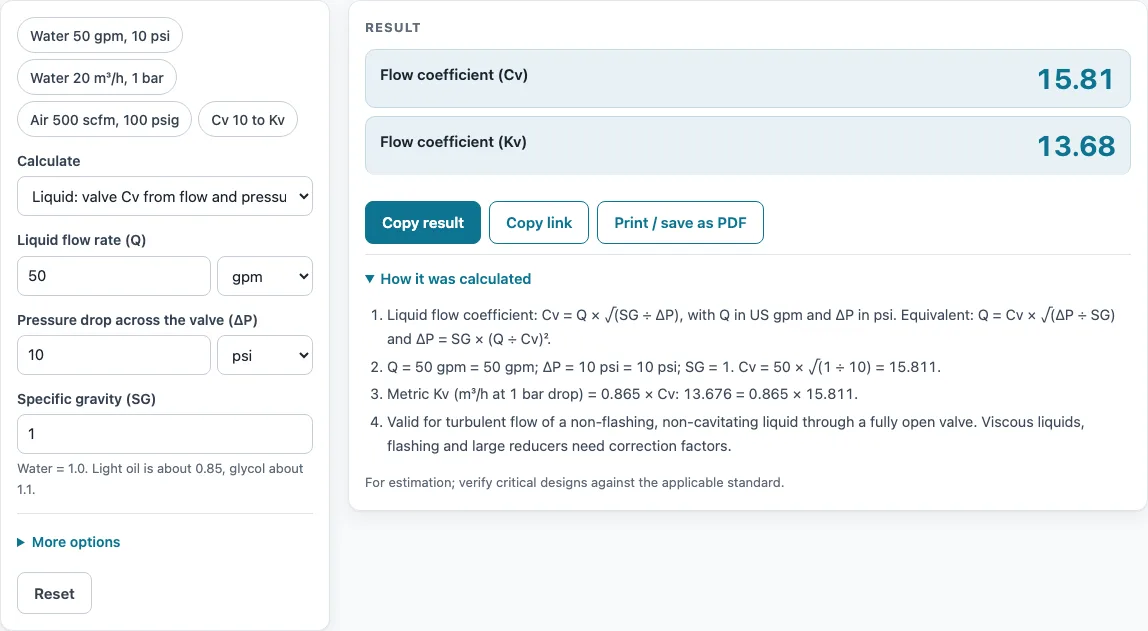
How to use the Cv calculator
- Under Calculate, choose what you want to find: valve Cv (with Kv shown next to it), liquid flow, pressure drop, gas Cv, or gas flow.
- For liquids, enter the flow and pick its unit: gpm, L/min, m3/h, or L/s.
- Enter the pressure drop and pick its unit: psi, bar, or kPa.
- Set the specific gravity. Water is 1.0.
- For gas, enter the inlet pressure P1 and outlet pressure P2 with their units. Leave Pressures are gauge ticked for psig or bar g readings (the tool adds 14.696 psi of atmospheric pressure); untick it for absolute pressures.
- Enter the gas temperature in F, C, or K, and the gas specific gravity Gg (air = 1).
- Read the result. Open “How it was calculated” to see the formula, the values substituted, and the answer with units.
The result updates as you type, so you can change one value and watch the answer move. Preset buttons above the form load typical cases, “More options” holds the less common inputs, and “Reset” restores the starting example.
“Copy result” copies the result lines with a link. “Copy link” copies the page address, which stores every input, so the same calculation reopens later or can be sent to a colleague. “Print / save as PDF” produces a one-page record with the inputs, results, calculation steps, and date.
What is the Cv formula?
The formula for liquids is Cv = Q × √(SG / ΔP). Q is the flow in US gallons per minute, SG is the specific gravity of the liquid, and ΔP is the pressure drop across the valve in psi. Cv is the number of US gallons per minute of water that a valve passes with a 1 psi drop, so a larger Cv means more flow for the same pressure loss.
The same equation rearranges to solve for the other values. Flow is Q = Cv × √(ΔP / SG), and pressure drop is ΔP = SG × (Q / Cv)². For example, 50 gpm of water through a 10 psi drop needs Cv 15.81, because 50 × √(1 / 10) = 15.81.
Kv is the metric version of the same coefficient, using m3/h and bar. Kv = 0.865 × Cv, so the valve above has Kv 13.68. To convert back, Cv = Kv × 1.156.
The liquid formula assumes turbulent, non-flashing, non-cavitating flow through a fully open valve. If the liquid is close to boiling or the valve is partly closed, treat the result as a starting point and check it against the valve manufacturer’s data.
What is the formula of Cv for gas flow?
For subcritical (low pressure-drop) gas flow, the formula is Q = 1360 × Cv × P1 × (1 − 2ΔP / (3 × P1)) × √(ΔP / (P1 × Gg × T)). Q is in scfh, pressures are in psia, and T is in degrees Rankine. Rearranged, the same equation gives the Cv needed for a known gas flow. Subcritical means P2 is above half of P1.
When P2 is at or below half of P1, the flow is critical, or choked. The formula then becomes Q = 0.471 × 1360 × Cv × P1 / √(Gg × T). In this case the flow no longer depends on P2, so lowering the outlet pressure further does not increase the flow. The calculator shows a warning when this case applies.
These gas formulas are the simplified forms of the ISA/IEC 60534 gas equation printed in Swagelok’s valve sizing bulletin, with N7 = 1360 (22.67 scfm × 60). They ignore gas compressibility and valve pressure recovery, so the result is an estimate; check critical valves with the manufacturer’s sizing software.
Example: 500 scfm of air at 100 psig inlet, 50 psig outlet, and 70 F needs Cv 9.450. A Cv 10 valve at 7 barg to 5 barg and 20 C passes 477.6 scfm.
Sources
- Cv definition and liquid equation: ISA-75.01.01 / IEC 60534-2-1
- Gas equations and N2 = 22.67 scfm (1360 scfh): Swagelok technical bulletin “Valve Sizing”
- Kv/Cv from NIST SP 811 unit factors (1 gpm, 1 psi, 1 bar)
Results are for estimation; verify critical designs against the applicable standard.
Worked examples
| Input | Result |
|---|---|
| Q = 50 gpm, ΔP = 10 psi, SG = 1 | Cv = 15.81 (Kv = 13.68) |
| Cv = 25, ΔP = 4 psi, SG = 0.85 | Q = 54.23 gpm (12.32 m³/h) |
| Cv = 40, Q = 100 gpm, SG = 1 | ΔP = 6.25 psi (0.4309 bar) |
| Q = 20 m³/h, ΔP = 1 bar, SG = 1 | Cv = 23.12 (Kv = 20) |
| Q = 500 scfm, P1 = 100 psig, P2 = 50 psig, T = 70 °F, Gg = 1 | Cv = 9.45 (Subcritical (P2 above half of P1)) |
| Cv = 10, P1 = 7 barg, P2 = 5 barg, T = 20 °C, Gg = 1 | Q = 477.6 scfm (Subcritical (P2 above half of P1)) |
| Cv = 10 | Kv = 8.65 |
Calculated by the tool above with these values.
Frequently asked questions
Can I use the results in commercial projects or client reports?
Yes. You can use results in commercial work, including quotes, design notes, reports, and client projects. Attribution is not required.
Is the calculator free, and is anything I type uploaded?
The calculator is free, and there is no account or sign-up. Everything is calculated in your browser, and nothing you type is uploaded.
Can I print or share a calculation?
Yes. Use “Print / save as PDF” for a one-page record, or “Copy link” to share the exact inputs. The printed record includes the date.
Why does the calculator show an error?
It shows an error if P2 is not below P1, or if the absolute temperature is not above 0 K (-273.15 C). Check the pressure order and the temperature units first.
What does the specific gravity warning mean?
A warning appears when the specific gravity is outside the range 0.3 to 3. Water is 1.0, so most water calculations need no change. For other liquids or gases, check the value against the fluid’s data sheet.
Does this calculator certify my design?
No. The page states “For estimation; verify critical designs against the applicable standard,” and the tool does not certify compliance with any code. For critical designs, check the result against the standard that applies to your project.
Related tools
- PVC Pipe Sizing Calculator and Chart for choosing pipe diameters for the lines that feed a valve.
- Compressed Air Pipe Sizing Calculator when the gas you are checking is compressed air in a distribution system.
- Flow Rate Calculator for working out flow from pipe size and velocity.
- Gas Pipe Sizing Calculator (Natural Gas and Propane) for sizing fuel gas lines.
- GPM Calculator (Gallons per Minute) for converting flow into gallons per minute.
- Hazen Williams Formula Calculator for estimating friction loss in water pipes.
- Mass Flow Rate Formula and Calculator when you need flow by mass rather than volume.
- All pipe, pump and valve calculators to browse the full set.